
Know what the alert actually says
A below-reorder indication means an item has met the configured rule in the selected stock scope. It does not, on its own, explain demand, supplier reliability or goods available elsewhere. Infinity includes reorder-level monitoring and planning views with historical information. Start by checking the selected store or warehouse source and the item’s current settings.
Use demand and time as planning inputs
Average daily quantity can help explain the relationship between demand and the time needed to replenish. As a simple illustrative example, a product selling ten units per day may require roughly seventy units to cover seven days before considering any buffer. This is a planning example, not a statement of Infinity’s universal reorder formula. Ask the team to show the formula and assumptions used in your configured report.
Treat safety stock as a deliberate choice
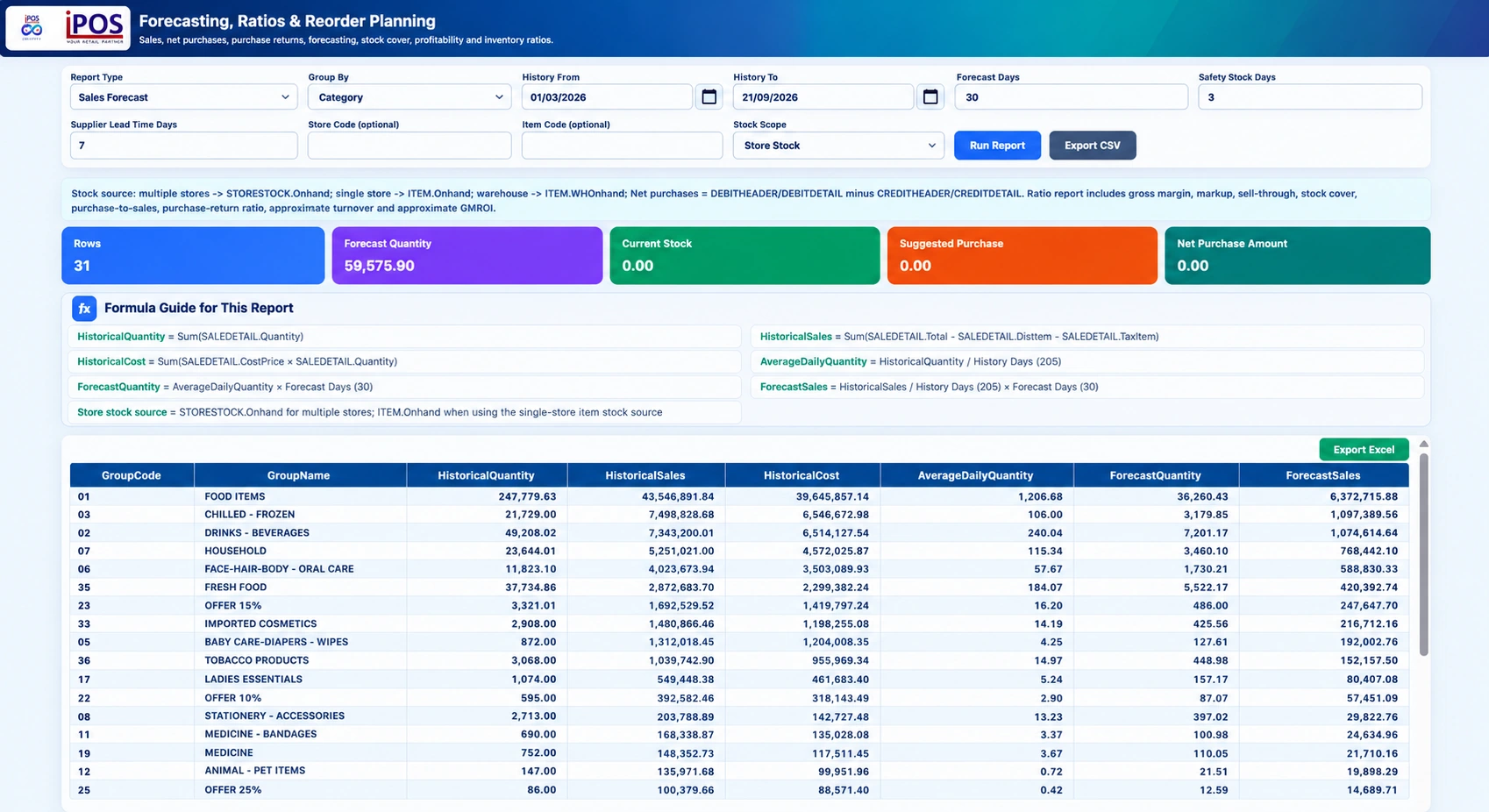
A safety-stock input should reflect the business’s tolerance for demand variation and delivery uncertainty. It should not be copied blindly across every item. Infinity’s supplied forecasting interface includes forecast days, safety-stock days and supplier lead-time inputs. Review them with the people who actually buy and receive goods, and inspect the calculation guidance displayed in the report.
Check exceptions before approving a purchase
A temporary promotion, a stock adjustment or a missing sales period can distort the planning context. Investigate unusual demand and check whether another location has usable excess stock. Slow-moving and dead-stock reports help surface a different kind of risk from a fast-selling item below its reorder level. An authorized buyer should review the proposal rather than treating every suggested quantity as an automatic order.
Review settings after operational changes
When suppliers, product ranges or demand patterns change, review the associated planning settings. Keep a record of why an important parameter changed and who approved it. During a demo, ask to follow one item from historical quantity to the forecast and purchase-planning view. The ability to explain the result is more useful than simply producing a large list of suggested purchases.
Your practical checklist
- Confirm the location and stock source.
- Review demand period, lead time and safety-stock assumptions.
- Investigate unusual sales or missing history.
- Approve replenishment through the business’s purchasing process.
Common questions
Is a forecast quantity the same as an approved purchase order?
No. A planning result supports a purchasing decision; authorization and ordering remain separate workflows.
Can Infinity display calculation guidance?
The supplied forecasting screen includes a formula guide for historical quantity, average daily quantity and forecast calculations.
Product scope is based on the supplied Infinity specification. Confirm modules, hardware compatibility and implementation responsibilities for your own setup. This guide does not make a competitor ranking or promise a business result.