
A live view still has a source and a timestamp
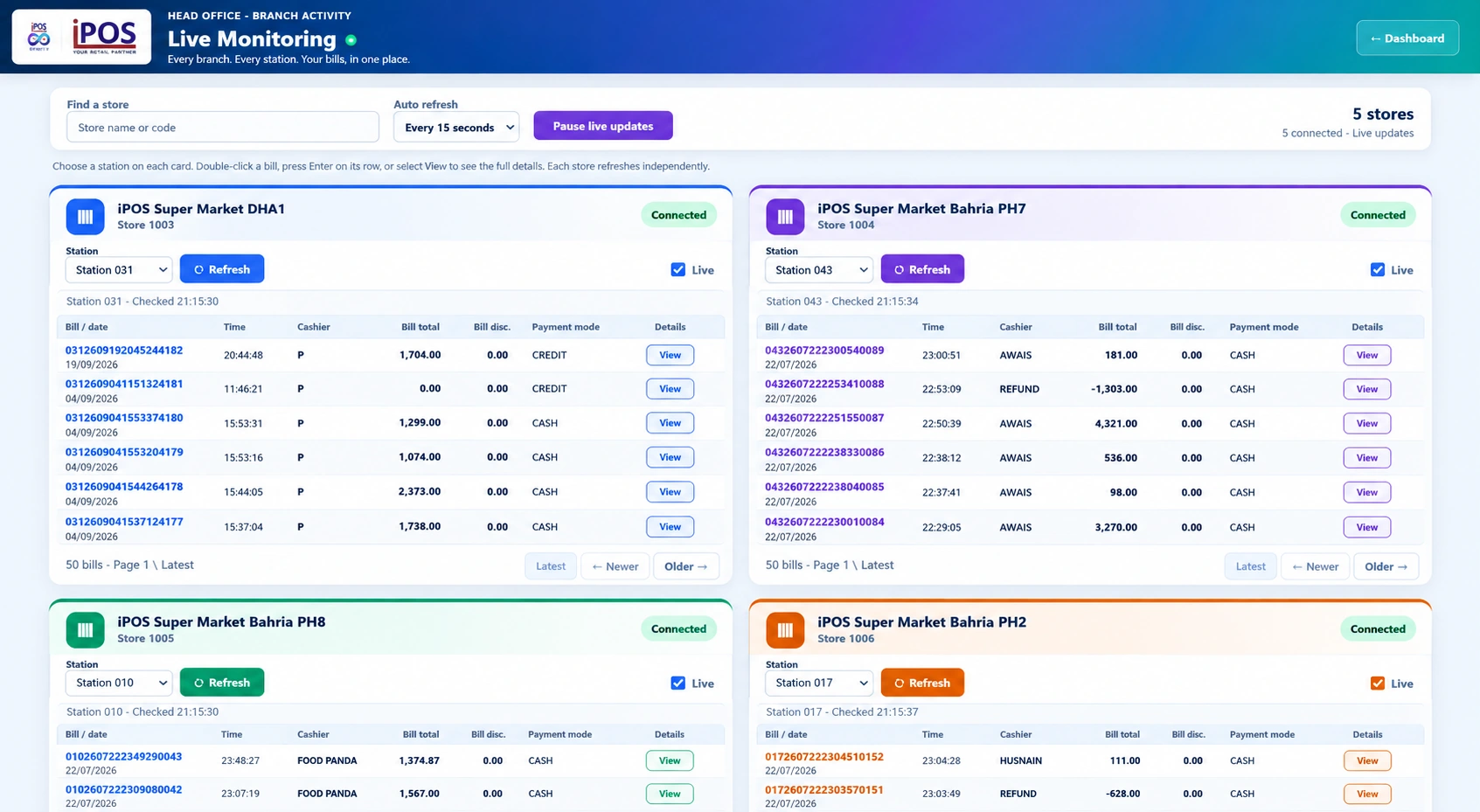
The word “live” should not replace checking where the information came from and when it was refreshed. Infinity’s supplied screens include update controls, connection states and station-level checking times. A manager should inspect those indicators before assuming every location is reporting the same moment.
Use the overview for orientation
The business overview brings sales, bill counts, refunds, voids, tax and gross margin into a consolidated screen. Store-level rows make it possible to inspect the contributors to the total. Use that overview to decide where to look next, not to invent a cause for a change. A low figure may require checking the reporting period or source connection before drawing conclusions.
Use transaction detail for investigation
The live-monitoring interface includes store cards, station selection, payment modes and bill-detail access. That allows a question raised by the overview to become a more specific review. Check the branch, station and transaction date before comparing the entries. The historical captures on this website demonstrate the interface, not the current activity of any store.
Distinguish a disconnected branch from a zero result
A disconnected or stale source and a genuinely zero trading result are different situations. Ask the implementation team how each is represented in the configured deployment. Identify who is responsible for following up on connection issues. Avoid building an operational decision around a value whose freshness is unclear.
Agree what each role needs to monitor
Cashiers, branch managers and head office may need different views and levels of detail. Infinity includes dedicated cashier and extended-management dashboards as well as user permissions. Scope those views around responsibilities. A focused dashboard with clearly understood data is more useful than showing every available metric to every user.
Your practical checklist
- Check source, period and refresh time.
- Investigate important changes using transaction detail.
- Separate offline or stale sources from true zero activity.
- Assign connection follow-up and role-specific access.
Common questions
Does “live” mean every displayed value updates continuously?
Not necessarily. Freshness depends on connected sources, configuration and refresh intervals.
Is the marketing website connected to a live POS system?
No. It displays supplied screenshots and clearly labelled illustrative interactions only.
Product scope is based on the supplied Infinity specification. Confirm modules, hardware compatibility and implementation responsibilities for your own setup. This guide does not make a competitor ranking or promise a business result.