
Start with a clear stock scope
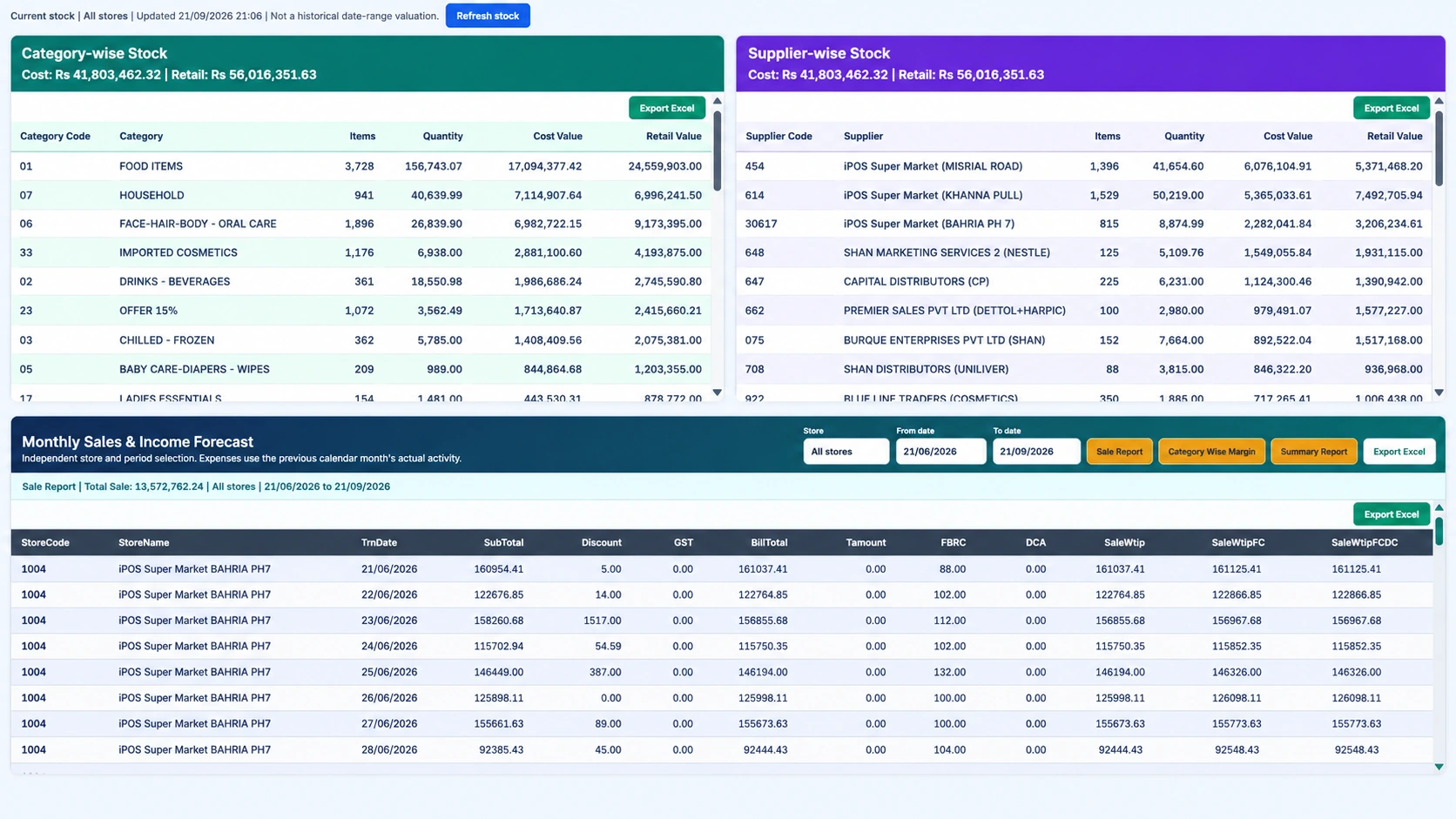
A stock figure needs context. Is it for one store, all stores or a warehouse? Does it describe the current position or a movement over a period? Infinity provides store-wise and item-wise stock with separate valuation views. Before using a report, confirm its location and source. Comparing a current quantity with a historical sales period can be useful, but they are not interchangeable measures.
Distinguish physical quantity from value
Quantity describes units, while cost and retail values describe different price perspectives. A product can have a large retail value without producing the same amount of gross profit. Infinity exposes stock valuation at cost and retail price so managers can inspect both views. Use consistent item units, product codes and locations when reviewing the numbers. Ask how the configured valuation treats price changes and stock movements before using it for a business decision.
Investigate the movement behind a discrepancy
A negative or unexpected quantity should trigger a transaction review. Check relevant purchases, sales, returns, transfers, debits, credits and adjustments. Infinity includes stock movement controls and item-focused reporting to support that review. An adjustment may correct the position, but it should not replace understanding why the difference appeared. Give authorized users a clear process for recording and reviewing changes.
Replenish with more than one signal
Reorder levels are useful, but the purchase discussion should also include recent demand, available stock at other locations and supplier lead time. Slow-moving and dead-stock identification can highlight items that need a different response from fast-selling products. Use store transfers where appropriate rather than automatically treating each branch as isolated. The aim is to ask a better question before buying, not to assume that one stock flag contains the full answer.
Build a repeatable inventory review
Choose a small set of recurring checks: negative stock, zero stock, below-reorder items and unusually large stock values. Assign ownership for each exception and keep the supporting transaction trail. During implementation, agree how opening stock is checked against the physical count and how later stock corrections will be authorized.
Your practical checklist
- Confirm whether the report covers stores, a warehouse or both.
- Separate quantity, cost value and retail value.
- Trace discrepancies through transaction history.
- Review stock exceptions with an accountable owner.
Common questions
Does a below-reorder item always need an immediate purchase?
Not necessarily. Review demand, lead time, stock elsewhere and the configured report scope before deciding.
Does Infinity identify slow-moving and dead stock?
Yes. These inventory-identification capabilities are included in the supplied product scope.
Product scope is based on the supplied Infinity specification. Confirm modules, hardware compatibility and implementation responsibilities for your own setup. This guide does not make a competitor ranking or promise a business result.