iPOS · YOUR RETAIL PARTNER
POS software in Pakistan.Built on experience.
From the checkout counter to the head-office view, iPOS helps connect your sales, stock and business records. Explore point-of-sale software backed by 31+ years of iPOS experience.
- Years of iPOS experience
- 31
- Live iPOS installations in Pakistan
- 15,000
- Serving retail businesses since
- 1995
EXPERIENCE THAT CONNECTS
A POS provider for the way your business works.
iPOS is a point-of-sale and business-software provider in Pakistan. We have served businesses since 1995, with 31+ years of experience and more than 15,000 live iPOS installations across the country.
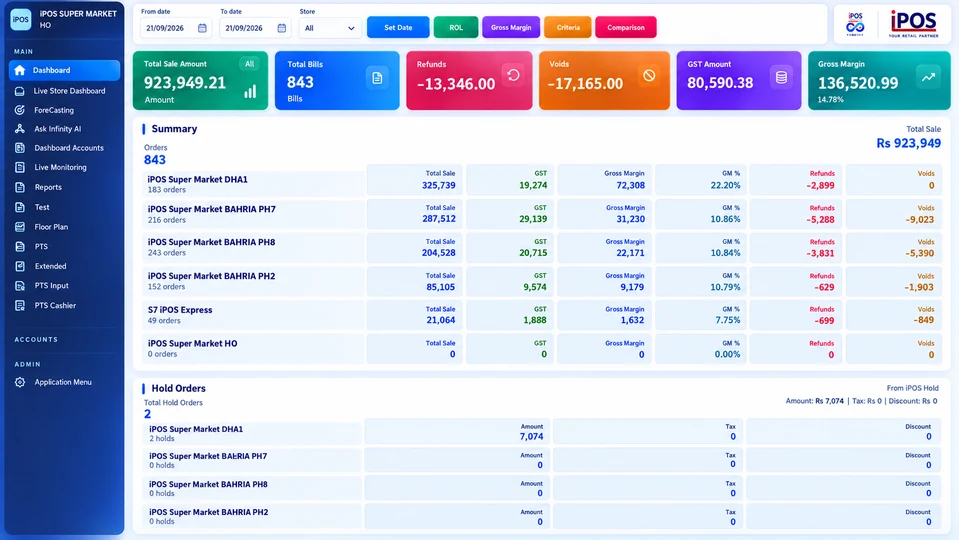
That experience spans the everyday work behind a retail operation: recording a sale, following stock movements, reviewing accounts and keeping multiple locations in view. iPOS Infinity brings these areas together in a connected business-management platform, while iPOS Web POS offers checkout in the browser.
The experience and installation figures refer to iPOS as a company, not solely to Infinity subscriptions. Learn about the company behind Infinity.
MORE THAN A BILLING SCREEN
What does a point-of-sale system do?
A point-of-sale (POS) system records the transaction when a customer buys a product or service. Depending on its configuration, it can connect billing with inventory, customer records, purchasing and business reporting. The right setup follows the transaction beyond the receipt.
- 01 / AT THE COUNTER
Record the sale.
Scan or select products, review prices, apply authorized discounts and complete the transaction. Demonstrate your required payment and return workflows before choosing a setup.
Point-of-sale capabilities - 02 / BEHIND THE COUNTER
Follow the stock.
Review items, purchases, stock movements, valuation and replenishment signals. Keep the stockroom connected to the information used at the counter.
Inventory management - 03 / ACROSS THE BUSINESS
See the bigger picture.
Bring accounts, branch comparisons and operational reporting into the same conversation. Review results with the period, location and detail behind the numbers.
Accounts and reporting
YOUR BUSINESS, YOUR REQUIREMENTS
POS software for retail and connected operations.
A supermarket, a restaurant and a multi-branch retailer need different demonstrations. Start with your daily workflows, then confirm the modules, devices and implementation scope for your business.
| Your operation | What to explore with iPOS |
|---|---|
| Supermarkets & grocery stores | Barcode checkout, product and price management, stock visibility and counter-to-head-office reporting. |
| Retail shops | Daily billing, returns, product records, purchasing and customer history across the selling floor and back office. |
| Restaurants & food businesses | Your billing and operational requirements, the devices you use and the reporting that managers need to review. |
| Fuel stations | Forecourt workflows and compatible pump, PTS-2 and ATG configurations, connected with the wider business view. |
| Warehouses | Receipts, stock valuation, item movement and transfers between warehouses and stores. |
| Multi-branch businesses | Branch-level stock and sales, head-office comparisons, user access and connected operational oversight. |
Explore the industries Infinity is designed for. Hardware, integrations and module availability must be confirmed for the proposed configuration.
CHOOSE ON EVIDENCE
Looking for the best POS provider in Pakistan?
The strongest choice is the one that fits your operation—not simply the one that makes the biggest claim.
Read the POS provider comparison guide ↗Ask every shortlisted provider to demonstrate the same sample transaction using your products. Follow a sale, an authorized discount and a return through stock and reporting. For multiple locations, inspect what a branch can see and what head office can control.
Discuss implementation as carefully as the interface: product-data preparation, opening stock and balances, staff training, backups, support channels and responsibility for updates. Ask for a written scope covering modules, branches, counters, users, equipment, integrations and recurring costs.
Bring iPOS into that evaluation with your actual requirements. Our company experience is useful context; a relevant demonstration is what helps you decide whether the proposed setup is right for your business.
CLEAR ANSWERS
Before your first iPOS demo.
Start here, then discuss the details of your own operation with the iPOS team.
What is iPOS?
iPOS is a point-of-sale and business-software provider serving businesses in Pakistan since 1995. iPOS Infinity connects POS, inventory, purchasing, accounting, multi-store operations and business reporting.
How much POS experience does iPOS have?
iPOS has 31+ years of experience and more than 15,000 live iPOS installations across Pakistan. These are company-level figures, not a count of Infinity subscriptions alone.
Is iPOS only for supermarket billing?
No. Infinity is designed for supermarkets, retail businesses, restaurants, fuel stations, warehouses and multi-branch organizations. The team should confirm your exact workflows, modules and compatible equipment during a product discussion.
Can I manage inventory, accounts and several stores?
iPOS Infinity includes inventory, purchasing, accounting and multi-store capability areas. Review the proposed configuration, branch connectivity, user access and implementation responsibilities in your demo.
How much does iPOS software cost?
Request a scoped proposal from the iPOS team. Discuss the modules, locations, counters, users, hardware, integrations and support you need, and ask which costs are one-time or recurring. This page does not quote a universal package price.
How do I request a demo in Pakistan?
Use the official iPOS contact page or call +92 51 4571215. Share your business type, locations, existing system and the workflows you need to see.
LET’S TALK ABOUT YOUR BUSINESS
A clearer next step.
A conversation with iPOS.
Tell us how your counters, stockroom and branches work. Let’s explore the right iPOS setup for your operation.
Office No.5, B-748, Ali Barlas Street,
4th Road, Satellite Town,
Rawalpindi, Punjab, Pakistan.
Current offices & contact details ↗